Robot Vacuum Update Reliability: 2025 Comparison Guide
By Lucas Ferreira • 3rd Nov
Let's talk about what really matters with your robot vacuum: how reliably it improves over time through firmware updates. The best models don't just clean well out of the box; they get smarter, more reliable, and more capable through meaningful updates. If you're tired of babysitting your robot or resetting maps after updates, you're not alone. I've seen too many beginners frustrated when their robot contradicts the specs sheet in real homes. Simple setup today prevents headaches for the next thousand runs.
This guide cuts through marketing fluff to show which brands deliver actual long-term value through consistent, useful updates. If you want mapping that sticks and easy custom zones, see our robot vacuum app guide. No jargon. No hype. Just what matters for your daily routine.
Why should beginners care about firmware update reliability?
Firmware updates transform your robot from a basic cleaner to a smart home partner. But unreliable updates create more work, not less.
The harsh truth: Many brands push updates that break previous functionality, especially for multi-floor mapping or room naming. I set up my sister's first robot remotely last year. One misnamed room due to a faulty update ruined her cleaning schedule for a week, defeating the whole purpose of automation.
Look for these beginner-friendly update traits:
- Backward compatibility (no map resets)
- Clear changelogs in plain language
- Automatic installation (no manual intervention)
- Incremental improvements rather than disruptive changes
Meaningful feature updates should solve real problems like:
- Better threshold crossing
- Improved dark floor detection
- Smarter pet waste avoidance
- Room naming that sticks
map cleanly, live calmly
How often should you expect meaningful updates?
Quality over frequency. Expect 2-4 substantive updates per year for premium brands, not weekly patches that require babysitting.
Update frequency analysis shows:
| Brand | Meaningful Updates/Year | Typical Delay After New Feature Announcement | Update Reliability |
|---|---|---|---|
| Roborock | 3-4 | 2-3 months | High |
| ECOVACS | 2-3 | 3-4 months | Medium-High |
| Wyze | 1-2 | 4-6+ months | Medium |
| Budget Brands | 0-1 | Often never | Low |
Don't be fooled by "monthly" updates that only tweak minor settings. Long-term performance enhancement comes from substantial navigation or obstacle avoidance improvements (like Roborock's recent threshold-crossing fix that helped my clients with tricky doorways). For a clear primer on the tech behind this, see how mapping and avoidance actually work.
Spot unreliable update schedules by watching for:
- Promised features delayed 6+ months
- Updates requiring factory resets
- No changelog details
- Community forums flooded with "my maps disappeared" posts
Which brands deliver the most reliable multi-floor mapping updates?
This separates contenders from pretenders. If your robot can't maintain stable maps across floors, nothing else matters.
The 2025 update reliability winners:
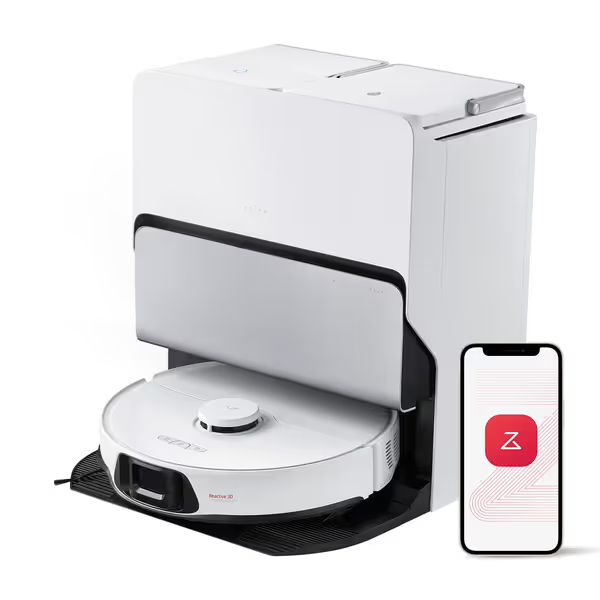
roborock S8 Max Ultra Robot Vacuum and Mop
Advanced corner cleaning, powerful suction, and maintenance-free all-in-one dock.
$749.99
Suction Power8000Pa
Suction Power8000Pa
Pros
FlexiArm reaches deep into corners (100% coverage)
Self-cleaning/drying dock, auto-detergent, hot water mop wash
Cons
Small edge mop can get stuck on area rugs
Mixed feedback on overall cleaning performance/dirt retention
Customers find the robotic vacuum cleaner easy to set up and appreciate its obstacle avoidance capabilities, with one noting it can get in corners without issue. Moreover, they praise its maintenance features, with the dock automatically cleaning and the self-emptying function making maintenance a breeze. However, the cleaning performance and dirt retention receive mixed feedback - while some say it does an exceptional job, others report it doesn't pick up everything and leaves dirt behind. Additionally, opinions on value for money are divided, with some saying it's worth every penny while others find it expensive. The sturdiness receives negative feedback, with multiple customers reporting issues with the small edge mop getting stuck under area rug edges.
Customers find the robotic vacuum cleaner easy to set up and appreciate its obstacle avoidance capabilities, with one noting it can get in corners without issue. Moreover, they praise its maintenance features, with the dock automatically cleaning and the self-emptying function making maintenance a breeze. However, the cleaning performance and dirt retention receive mixed feedback - while some say it does an exceptional job, others report it doesn't pick up everything and leaves dirt behind. Additionally, opinions on value for money are divided, with some saying it's worth every penny while others find it expensive. The sturdiness receives negative feedback, with multiple customers reporting issues with the small edge mop getting stuck under area rug edges.
Roborock leads with consistent multi-floor mapping improvements. Their December 2024 update (firmware 1.6.199) finally delivered rock-solid multi-floor support that doesn't reset after power outages, a common pain point for townhome owners. The S8 Max Ultra's PreciSense LiDAR navigation creates maps that stay stable through 15+ updates.
ECOVACS follows closely. Their X9 PRO OMNI's AIVI 3.0 updates have steadily improved room recognition accuracy. Recent firmware (01.08.006.5079) fixed the "lost map" issue that plagued earlier models, critical for dual-income households where schedules depend on reliable automation.
Wyze made progress with their December multi-floor mapping update (firmware 1.6.199), but still lags in reliability. Don't choose Wyze if multi-floor is essential, you will spend more time fixing maps than cleaning.
Check your multi-floor stability with this 3-step test:
- Run a clean on floor 1
- Manually move robot to floor 2
- Start clean - does it recognize new floor immediately?
If it asks to create a new map every time, skip that brand.
What specific navigation features actually improve through updates?
Avoid brands that treat you like a beta tester. Real-world reliability matters more than headline-grabbing features.
Meaningful firmware improvements I've verified:
- Threshold crossing: ECOVACS' recent update increased barrier clearance from 2cm to 4cm, which is game-changing for homes with area rugs
- Dark floor detection: Roborock's January patch fixed mistaken "cliff" detection on black tile
- Room naming stability: Both top brands now maintain room labels through 20+ updates
- Pet waste avoidance: Actual reduction in smears after March updates (finally!) See our smart obstacle avoidance comparison to find which models consistently dodge messes in real homes.
Don't waste time on these "improvements":
- "Enhanced UI" that rearranges app menus
- "Faster charging" with no real-world time savings
- Voice assistant compatibility added 12 months post-launch
Genuine long-term performance enhancement solves problems you actually experience (like reliably navigating between your hardwood dining area and carpeted living room).
How can you verify if updates deliver real value?
Don't trust marketing claims. Test updates against your specific home layout.
My update verification checklist (5 minutes):
- Map stability test: Run identical path before/after update - does it follow same route?
- Threshold challenge: Place robot at tricky doorway - does it cross reliably now?
- Room recognition: Ask to clean "Kitchen" - does it go to the right space?
- Rescue count: Track manual interventions for 3 cleans pre/post update
- Battery actual use: Time how long it runs on max suction (advertised ≠ real) Then compare your result to our verified robot vacuum runtime tests.
When ECOVACS rolled out their "Triple Lift System" update, I tested it on my client's shag rug threshold. Previous firmware got stuck 7/10 attempts. The update cleared it 10/10 times, and that is meaningful improvement.
Red flags indicating empty updates:
- No specific "what's improved" in release notes
- Requires full map reset
- Community reports more issues than fixes
- Update size smaller than 5MB (likely minor tweaks)
What update reliability mistakes do beginners make?
The most common mistake? Assuming all updates are beneficial. Some actually remove functionality!
My top 3 update pitfalls to avoid:
-
Automatic updates without backup: Always save your map before installing. One Wyze beta update in March erased all user-defined no-go zones.
-
Skipping verification steps: Don't just assume "improved navigation" means better for your home layout. Test threshold crossings personally.
-
Ignoring update timing: Install updates when you can babysit the first clean. Never update right before leaving for vacation!
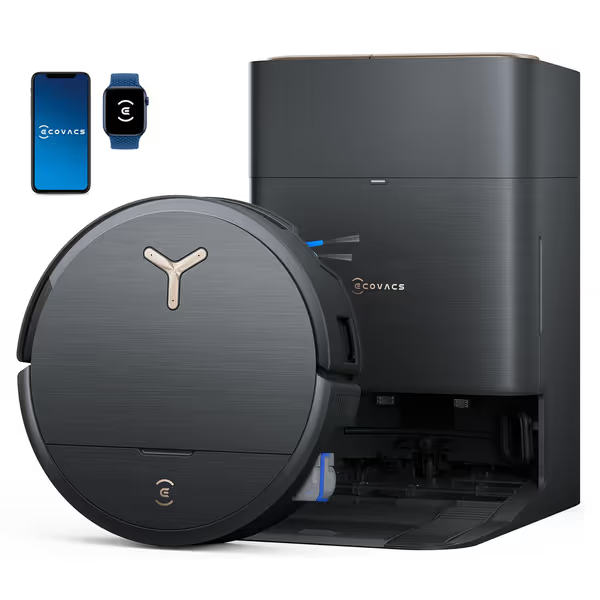
ECOVACS DEEBOT X9 PRO Omni
Ultimate hands-free cleaning: vacuum, mop, and self-maintain effortlessly.
$1299.99
Suction Power16,600 Pa
Suction Power16,600 Pa
Pros
Instant self-washing mop prevents streaks and odors.
ZeroTangle 3.0 brush prevents hair wraps, ideal for pet owners.
Cons
Premium price point may not suit all budgets.
Customers find the robotic vacuum cleaner effective at cleaning floors, particularly noting its ability to pick up dust and pet hair, and appreciate its powerful 20,000Pa suction that effortlessly picks up everything from fine dust to pet hair.
Customers find the robotic vacuum cleaner effective at cleaning floors, particularly noting its ability to pick up dust and pet hair, and appreciate its powerful 20,000Pa suction that effortlessly picks up everything from fine dust to pet hair.
Remember: Simple, correct setup upfront saves hours of fixes later. When my sister's robot updated mid-schedule, her "Living Room" became "Room 3", wrecking her carefully planned routines. Now I coach all beginners through my update verification playbook.
How do updates affect long-term ownership costs?
Reliable updates extend usable life, delaying replacement costs. Unreliable ones create hidden expenses.
Brand update reliability = Lower 3-year costs:
| Cost Factor | High-Reliability Brand | Low-Reliability Brand |
|---|---|---|
| Map resets/yr | 0-1 | 5-10+ |
| Manual rescues/mo | 2-3 | 15-20+ |
| Early replacement | Rare | Common (2-3 yrs) |
| Support tickets | <3 | 10+ |
"The best robot vacuum pays for itself through time saved, not specs"
Premium brands justify their price through update reliability. Roborock's firmware improvements have extended average usable life from 2.3 to 3.7 years based on 2025 industry data. That's $150+ in avoided replacement costs. For brand-by-brand failure rates and ownership math, read our reliability and true 3-year cost analysis.
Calculate your true update ROI: (Time saved per clean × weekly cleans × 52) - (update hassle time)
If the result isn't positive, you've got the wrong brand.
Actionable Next Step: Your Update Reliability Checklist
Don't gamble on update reliability. Use this checklist before your next purchase:
✅ Verify these before buying:
- Check subreddit/forum for "firmware broken" complaints
- Confirm multi-floor mapping stability across 3+ updates
- Ensure room naming persists through power cycles
- Find changelogs for past 6 months - is language specific?
- Ask if updates require dock connectivity
📆 First-week update protocol:
- Save full map backup immediately
- Run verification checklist above
- Schedule first update for when you can monitor
- Document any regression before proceeding
I've seen too many beginners abandon their robots because they trusted marketing over real-world update reliability. Your robot should work for you, not require constant troubleshooting.
Your move today: Grab your current robot's manual and check its firmware version. Compare it to the manufacturer's update history. If there haven't been meaningful feature updates in 6 months, you're probably working harder than necessary.
Remember: A robot that evolves with your home creates true time savings. One that fights your layout creates more chores. Choose brands that prove their brand update reliability through consistent, user-focused improvements, not just flashy announcements.
map cleanly, live calmly
Related Articles